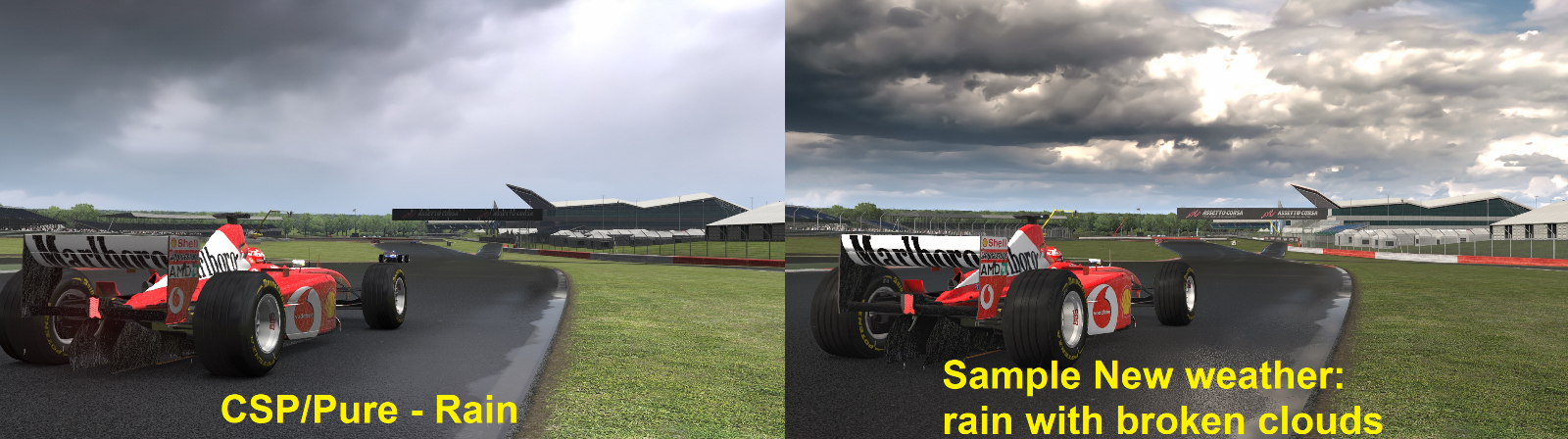
For those who still play AC, there’s life in this old dog yet. Sol (and it’s latest incarnation “Pure”) gives us weather effects to die for (ground fog/mist, for example is stunning), visuals that are practically current gen and CSP now gives us extremely convincing aquaplaning and wet physics as well. Along with assettoserver’s online server incarnation, AC has the whole show covered now!
This is my contribution, which I will be posting on Overtake as well – an app which generates random weather systems that can then be used both online and offline.
Rather than creating “generic” weather systems for each track/country, I have gone for a two-tier approach a bit like the old F1-series where you generate a random weather forecast first and then separate random weather systems for each session. Unlike the F1-series though, a really rainy day might still present a gap in the clouds with dry conditions to race in, so it is truly random. I have also done some mixing and matching with rain levels and visuals to create a more interesting and immersive set of extra weathers to accompany the somewhat bland default rainy ones – my new weathers even create rainbows in the right circumstances, such is the brilliance of the Pure software. I have also done a lot of work to make the transition from wet to dry and back again more natural, the software does have a tendency to flood the track and then dry out instantly, whereas my puddles hang around quite a long time after the rain has stopped and the track remains greasy for a while too. I am also working through the FtF cars as we speak, the F2002, F138 & Mclaren MP4-4 are already “RainFx enabled” and it’s all tuned to create those classic dilemmas of when/if to go onto inters/full wets etc.
How the app works:-
- The top section of the window contains weather parameters for each country/track. It’s all fairly self-explanatiory, but if you find my weathers a bit “too interesting” then decrease the “variability” parameter. Remember to click the SAVE button as it doesn’t save on-the-fly.
- The paths define where the random weather plans are stored (for Pure offline) and where the server configuration files (.ymls) are generated (for AssettoServer online). Change these to match your PC configuration. Inside the app folder, there is a config.ini file which stores these paths, so the easiest way to set them up first time is to edit this file and copy-paste from Explorer (right click a file in the folder, then select “details” and copy from the “Folder path”.
- To generate the weather forecasts for each session, simply click the “Generate Weather Forecasts” button. Descriptions of each session’s weather are displayed at the bottom of the window.
- For offline races/practice, simply click the “Generate Pure Plans” buttons and they are created instantly. Then just load the plan you want using the “Pure Planner” app. The plans for practice, quali & race are all prefixed “FtF_PurePlan_”.
- For online weather:-
- In extra_cfg.yml on the server, you will need to set “EnableWeatherFx: true” and “EnablePlugins:
– RandomWeatherPlugin” - There are 2 options now to generate random weather plugin weightings and both integrate into an enhanced version of the plugin. “Generate Generic Weather YAML” gives you random weather weightings you can just leave on forever, however the very nature of “generic” means it won’t be as realistic as using weather forecasts, so my preference is for you to use the “Generate Session Forecasts YAMLs” button instead. This creates 3 different YAMLs for practice, qualifying and race and these correspond directly to the weather forecasts. Note that the last option you take is the one that is used by the server.
- The “FtF Server Weather Controller” app is now redundant as the random plugin has been enhanced to control the loading of the session forecasts automatically.
- Each session initiates with a complete dry-out followed by opening the first random weather which hangs around for two and half minutes before transitioning to the next random weather.
- The plugin weather patterns work in a very similar manner to the Pure Plans in that drying/wetting has momentum built-in rather than the program just randomly hunting between weathers. For example, if the weather has dried to a fine drizzle, it is more likely now to continue drying out rather than hunting back up and down the rain levels – showers are very much a real thing now.
- Note also that the welcome.txt file on the server is updated automatically with the weather forecasts. Practice is always a hybrid of Quali & Race weather.
- In extra_cfg.yml on the server, you will need to set “EnableWeatherFx: true” and “EnablePlugins:
I have had to do my own modifications to the assettoserver software (CSP weather only works with their server implementation) as my weather systems effectively have 6 new weathers which are not supported. I also find the rain implementation a bit abrupt, so have modified it to be a it more gradual. As of release 1.0, the plugin works more realistically and loads the session weathers in automatically.
No need to use my server_cfg.ini, entry_list.ini files, just replace them with your own (preferably generated with CM and using a Sol/Pure weather slot setting (probably not necessary). Then your existing Port Forwarding will work just fine.
__________________________________________________________________________________________________________________
Prerequisites:-
Content Manager – everyone uses this now right?
CSP 2.11 or higher and needs to be a “full” version for rainFX to work, so become a Patreon (details below) either permanently or temporarily to get access to the full version.
To use the Pure plans offline, you will need a version of Pure which is similar to CSP with Patreon contribution. If you just want online weather, then Sol should do the job just fine, although I haven’t tested this personally.
__________________________________________________________________________________________________________________
Downloads:-
The apps:- FtF Weather Apps (235 downloads)
- The Mclaren MP4-4:- Guidelines/Downloads Here
- The Ferrari F310B:- Guidelines/Downloads Here
- The F2002:- Guidelines/Downloads Here
- The F2004:- Guidelines/Downloads Here
- The Williams FW31:- Guidelines/Downloads Here
- The Ferrari F138:- Guidelines/Downloads Here
- The Ferrari SF15T:- Guidelines/Downloads Here
- The Ferrari SF70H:- Guidelines/Downloads Here
The server:- Assettoserver - FtF Version (188 downloads)
The server requires .NET 9 to be installed :- https://dotnet.microsoft.com/en-us/download/dotnet/9.0
Please install the server onto your desktop and run it from here or at the very least, keep it separate from the main game. To start the server, locate and double-click Assettoserver.exe.
__________________________________________________________________________________________________________________
Source code for server is available at: https://github.com/robertodeacon-pixel/AssettoServer
Original project: https://github.com/compujuckel/AssettoServer
Please also consider becoming a Patreon at https://www.patreon.com/assettoserver
along with:-
CSP/Content Manager: https://www.patreon.com/c/x4fab/posts?vanity=x4fab
Pure: https://www.patreon.com/c/peterboese/posts?vanity=peterboese
These projects keep the original game evolving.